Jennifer Wood
Instructional Technology Portfolio
Introduction
I have worked as a virtual faculty member for the University of Maryland Global Campus since 2008. I have learned several learning management systems from the ground up and use this technology daily. Right now, I see many friends and colleagues struggle with making the transition to fully online learning. I would like to utilize my existing skills in this area to facilitate the leap from face-to-face classes to virtual and blended learning. I would like to show teachers and administrators that, while there is a learning curve, much of the anxiety and stress that they feel about technology as a vehicle to deliver classroom content can be managed and minimized with effective guidance.
Our children are digital natives. They were born into a society where access to and use of technological devises is ubiquitous. Even without the current pandemic it is our responsibility as educators to ensure that students are capable of functioning in a distributed, virtual environment responsibly and with purpose. Students must see technology not only as something that transmits games, entertainment and social media but also as powerful learning tool that can transform the way they access information and gain skills.
Access my resume here
Portfolio Element 1: Visionary Leadership
Vision statement
Through the use of technology, students will engage their teachers and their age/learner-appropriate academic content in order to build on existing knowledge and skills that are necessary for them to lead high functioning lives and contribute to their communities. Students will learn to conduct themselves safely and appropriately in the online learning community, take responsibility for their learning outcomes and develop an understanding of the importance of academic integrity in a virtual setting.
This vision would be made a reality by working closely with teachers and administrators to adapt the face-to-face learning environment into a dynamic, interactive and cohesive online experience. Teachers already have an enormous amount of familiarity and experience with their grade level content. I will work with teachers one and one and in groups to modify, enhance and adapt existing lesson plans, or create new ones as needed, that best reflect the foundation of connecting with students that honors the reason so many people are drawn to the field of education.
Accountability
The students and teachers will hold me accountable for my work. If a lesson or methodology does not resonate with students, teachers or parents, it will be back to the drawing board! This is not a one-size-fits-all situation. Our circumstances are evolving and so will our use of technology.
Students will develop knowledge and skills in a virtual setting much like they do in the face-to-face classroom. Academic skills build on each other; a virtual classroom can and should be designed in such a way as to encourage the logical progression of content from one unit to the next based on previously mastered content.
job description
If I am doing my job well, teachers would have this to say about my work:
Jennifer was a great source of support and guidance as I learned how to build my virtual classroom. She had great suggestions for how to adapt my lessons to go online so that they were easy to understand and fun for the students. When I needed help actually getting the lessons into Canvas and up and running, she was there to walk me through the procedure with patience and good humor.
Administrators would have this to say:
Jennifer really helped my teachers feel supported and comfortable getting their classes ready for the Fall. Many were reluctant and nervous about the new platform but Jennifer helped them realize that the technology was not that hard to learn and they are now excited about engaging their students in this new way.
Portfolio Element 2: Integration
Specific lesson plans will be designed in collaboration with the teacher or grade level teams.
Learning activities may include watching videos for specific content such as:
Students may be assessed by being asked to complete a small project or PowerPoint presentation based on their research and understanding of the material covered. Younger students, students who are not performing at grade level or who may not have support or technology at home may be asked to write a paragraph explaining their understanding of key concepts or to draw a picture.
Learning must be interactive and students must feel that they are capable of independent thought and mastery of key concepts. Learning should be adaptable to students’ specific situations.
click here for additional details about specific learning plans for 6th grade science


Portfolio Element 3: Digital Age Learning Environment
At the elementary level, students learn through experiencing concepts in a variety of ways – instruction delivered by teachers, hands-on manipulative tools, group and individual tasks and other assignments. Learning is highly interactive and engaging. Blended learning is defined as a combination of electronic learning and face-to-face classroom-based instruction. In the immediate future, with face-to-face instruction in the classroom no longer an option, teachers need to find ways to provide this highly interactive format and maintain connections to students that facilitate one-on-one interaction to the extent possible. So, how does this happen?
Blended learning will be distinct for each grade level, but can be established through a variety of formats to include zoom meetings, short term assignments that can be accomplished through worksheets, read and response journals, or on longer term independent projects. The face-to-face portion of instruction and the opportunities to use hands-on manipulatives may be more limited but through videos and utilizing common household items, teachers can often come close to recreating the experience for many students.
Teachers must establish their leadership in the virtual classroom just as they would in the regular classroom. Identifying classroom standards of behavior and expectations for peer-to-peer interaction is critical not only for the immediate virtual situation but with the thought that the students will be returning to classroom instruction sooner or later and these standards matter. Just as in a face-to-face setting, some of these standards, such as identifying a class mission statement, should be established collaboratively with the students. This can be done via a group zoom session, through discussion posts, or breaking students into small groups.
Similarly, teachers must identify and communicate clearly their expectations of appropriate language, punctuality on zoom calls and with assignments, and treating each other with respect by listening carefully to their peers while engaged in an online session.
Just as a teacher would in a face-to-face setting, guidelines should be made available to students and parents and should be communicated frequently.
I see it as the job of the IT coach to help teachers identify online resources by doing that research ahead of time and presenting them with high quality options for content, virtual experiments and videos. It is my intention to create a virtual library of resources, with the support of the librarian and the IT specialist, so that teachers may readily access online content that enhances their courses. In the event that these sources do not meet the specific needs of individual teachers, I would work with them to identify more appropriate and immediately useful content.
The same good judgment and careful attention to alignment with the standards of learning are needed for virtual content as are needed for use in the regular classroom. Teachers possess the ability to discern the quality of course content. While a simple Google research may be a good place to start, teachers must also begin to learn to look for who is publishing the content and whether the content is actually what it is advertised to be. It will be important for the ITC to train teachers to look for questionable content that is intended to confuse or mislead teachers and students alike.
Portfolio Element 4: Digital Citizenship

Digital citizenship is defined as appropriate behaviors and safety measures that must guide each student, teacher and parent when they are online. This includes not only interacting with classmates on Zoom but also researching content for projects and utilizing social media. Proper guidelines help students identify potential predators, distinguish between legitimate content and scams, and minimize cyber bullying. These lessons must be taught consistently and explicitly through direct instruction and the guidelines must be reinforced periodically to ensure that students understand the basic principles and are sticking to them.
Teachers must model the behavior they want to see in their students by using classroom appropriate language and evaluating sources students include as references in their work (primarily for older students). Similarly, for younger students, teachers may want to limit access to the open Internet by encouraging parents to place parental controls on computers their children may access.
There are resources available to teach students appropriate online behavior and how to protect their identity. Organizations such as the Center for Missing and Exploited Children provide such training and they are willing and able to come to Prince William County Schools to provide this training. When I served as the Academic Advisory Council Chair at Bennett Elementary School, I brought them in to talk with parents.
Portfolio Element 5: Professional Development–Training Experience
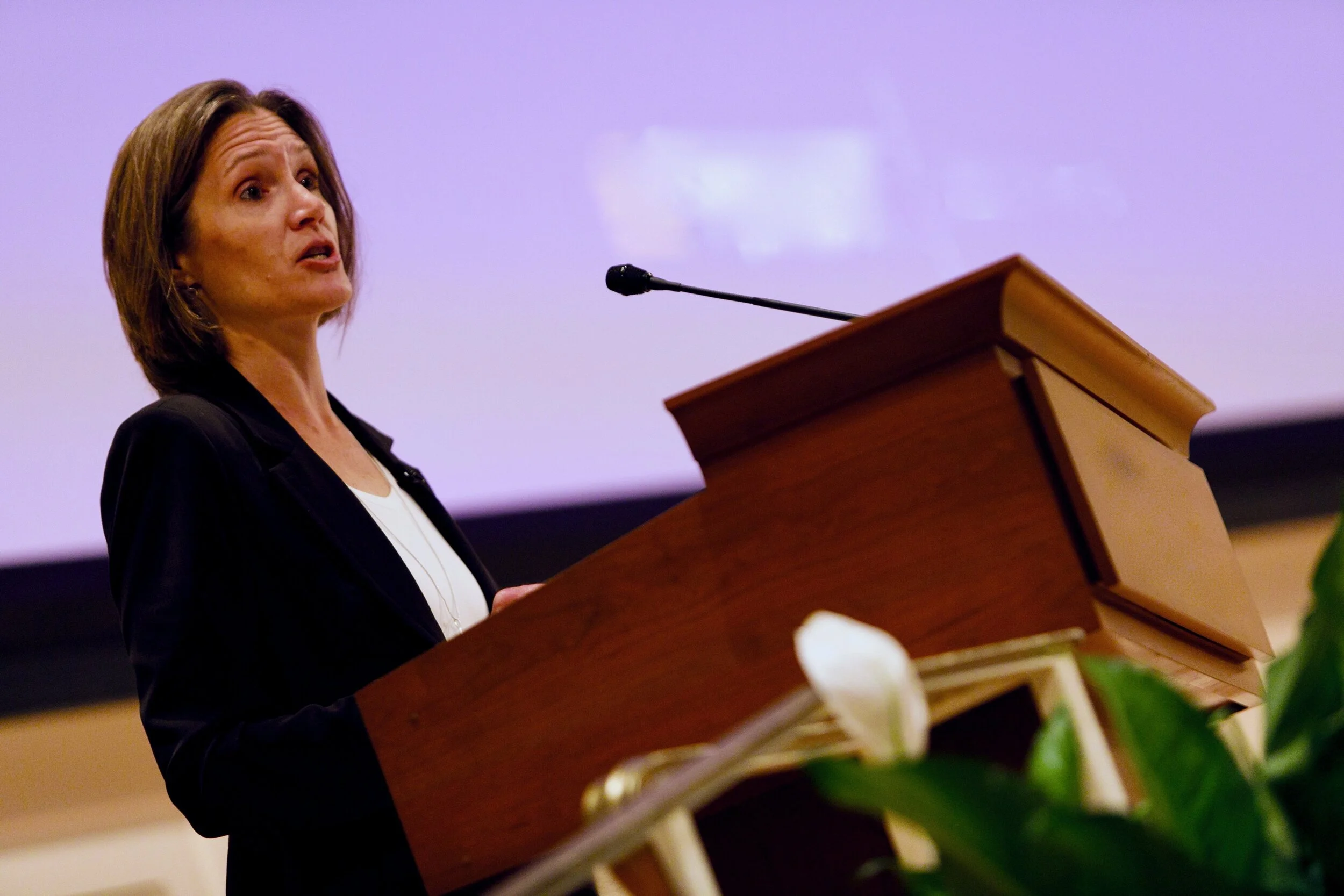
Jennifer Wood presenting as keynote speaker at UVA’s Day of Learning
I have conducted many professional development workshops in Prince William County, presented at a national conference and was the keynote speaker at a day of learning for a major East Coast university. Topics have included mindfulness, personal health and wellness, and strategies to enhance well-being in the workspace. Outlines, presentations and feedback from reviewers are included here.
Typically when I present, I provide an overview of the subject I am covering and then dive a little deeper into the topic so that people who are new to the subject have a bit of background while those who are familiar with the subject and need more in-depth information are still engaged. Breakout activities also encourage greater depth of learning and allow peers to interact and share details that are specific to their own experience. Keeping presentations focused, interactive and lively is key to effective learning. Many teachers feel anxiety about transitioning to the online learning format so brevity and clarity will be necessary. Also, it is extremely important to ensure that teachers feel heard, supported and reassured. There is no room here for condescending attitudes or belittling.
Click here for an example of professional development workshop
Click here for a sample of student feedback in virtual classroom
Click here for sample agenda for PWCS professional development workshop
Feedback includes:
This was the best Stress Management in-service in my 30 years of PWCS! The setting, the content, the speakers...booyah!
We're already seeing such positive results in our students and ourselves.
Portfolio Element 6: Coaching
In addition to teaching fully online for the last 12 years, I am also a trained coach (certified through the National Board for Health and Wellness Professionals). Coaching an individual who feels certain about their skills and abilities requires a great deal of support, understanding and encouragement. Asking powerful questions, often taking the form of either a “what” question or a “how” question, can be a great way to help an person uncover what might be holding them back or, more importantly in this case, what they need to move forward.
If a teacher were to contact me asking to support a research project using technology, I would provide the teacher with a form to gather the initial information about the project (see below).
Once I had an idea of what the teacher was looking for (i.e. topic, grade level, timeline, existing materials, intended outcome for the learning experience), I would do initial research to find what resources or avenues were available and come up with several ideas that would serve as a starting point for the conversation with the teacher. The key word here is starting point. The final project would be the result of collaboration and communication between me, the teacher and any other relevant parts (Encore teachers, Signet, Special Education teacher ect…)
Considerations:
How old are the students?
What computer skills do the students possess?
How many students will be doing this project? Is the project 100% virtual or is it a blended learning experience?
What types of computers are available to students? Do all students have high speed internet access?
Will students be expected to work on this assignment at home as well as at school?
How long will students have to work on this project?
Ex: Preparation:
Have examples of technology supporting material ready to show teacher.
Ask if teacher is comfortable with the technology.
Answer teacher’s questions.
Anticipate difficulties with technology and be prepared to coach teacher through these possible difficulties.
Questions to ask teacher:
What is the specific assignment?
What is the students’ current understanding of this topic e.g. is this a new topic or is this a summary of a well known topic?
Are their specific technology skills you would like the students to master as a result of working through this project?
How do you envision technology might be helpful with this project?
When is the assignment due?
Recommendations?
Recommend several activities that the teacher might chose from – from the simplest use of technology to increasingly more complex uses.
Follow up:
Visit the classroom or meet virtually to lead a discussion of what the students feel they have accomplished. What new skills did they learn? Would they be interested in expanding their computer skills?
Portfolio Element 7: Life Long Learner
I have taught online for the last 12 years (12 years at University of Maryland Global Campus (UMGC); three years at Colorado State Global and one year at Maryland University of Integrative Health). Each university had its own platform and UMGC has switched Online Learning Platforms three times since I have worked there. Each university required that I complete training on their system and UMGC requires on-going training on new tools such a Turnitin.com (plagiarism detection).

In addition to that, I am in the process of reading the book Instructional Design for ELearning and completing the online training class that can be found here:
Instructional design for elearning
Upon being hired, I would also begin this training program:
Duke University certificate for elearning
I never stop learning and growing and I am not at all afraid to learn by doing (also known as good old-fashioned trial and error). I believe this type of approach sends a powerful message to my own children, who are students in PWCS and to teachers who may be afraid to “break something” while they struggle to learn to utilize the new technology effectively.
Portfolio Element 8: Reflect on Your Practice as an Educator
Demonstrated Application of Standards
LEARNER As a health coach, I learned how to create my own website, using several platforms before I finally found one that suited my needs and was easy to use. This is a good example of my own professional development and the “trial and error” approach I am comfortable implementing when learning new skills.
LEADER I served as a faculty mentor for UMGC while the program was up and running (now defunct). In this capacity, I supported new faculty members through training on the online platform and acted as a source of support and guidance during the first semester of teaching online. Similarly, I am now offering support and guidance to friends who currently teach in PWCS.
DESIGNER In my classrooms at UMGC, I continuously seek out new tools and resources that benefit my students as they grow and learn in their chosen field. For example, the University recently enacted a policy that required all faculty to eliminate textbooks as required reading and find instead free and open-source materials to support learning. This meant I had to identify, review, select and implement completely new sources for my classroom.
FACILITATOR As an online faculty member at UMGC, one of my main roles is as facilitator. I post, monitor and respond to weekly discussion posts where students share ideas and research on specific topics. I have set the standard of responding to every single student at least once a week in the discussion platform as a way to stay engaged in the online learning and to keep discussion and learning moving forward.
